Training an AI Agent Is Teaching You How to Manage: A reflection on patience, process, and the human skills hiding inside the machine
in Fractional CFO, AI, CFO, Claude, All Posts
I’ve been spending a lot of time with Claude lately. Not because I want to but because AI agents are not a mindless effort if you want them to work correctly.
Recently, I was at a networking event with other Fractional CFOs, and one of my friends there was explaining Claude to a newbie:
“You just need to talk to it like an employee,” was the refrain.
In another conversation I had over email with a CFO, he told me he automated a lot of his closing process using Claude Code by spending “4 to 5 hours a day for the last 30 days.” Notwithstanding the fact that it sounds like his closing process was a mess to begin with, 4 to 5 hours a day for 30 days is quite a commitment, and you would likely never do that with a human trainee.
So what’s my point. On one end you have a CFO who said: talk to it like an employee. On the other end, a CFO who spent 150 hours to get a complex process to work. I’ve done work with Claude Chat, Claude Cowork, and Claude Code and can tell you the reality is somewhere in between. But what I want to focus on is this:
if you lacked management patience for training and process improvement before all these AI innovations, you are in for a struggle.
On the other hand, if you go through the struggle, it could make you a better manager.
TL;DR:
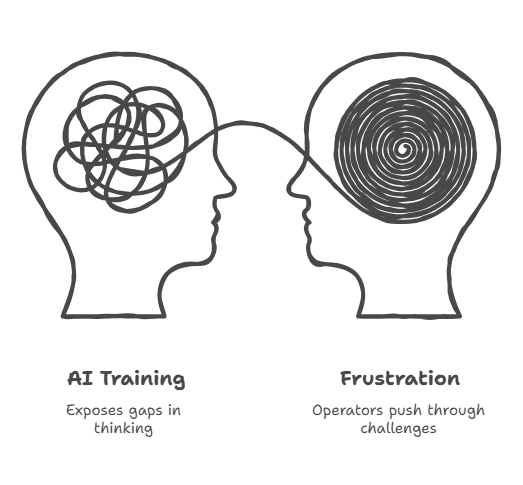
Training an AI agent exposes every gap in your own thinking that you’ve been papering over with informal communication and institutional memory. The operators who push through that frustration tend to come out the other side as clearer thinkers and better managers. The ones who walk away were probably avoiding that reckoning anyway.
Use Case Highlight: Three Tools, Three Different Commitments
Before I get into the management angle, it’s worth briefly grounding what each of these Claude tools actually is, because they are not the same thing.
Claude Chat is the conversational interface most people start with. You ask questions, draft content, analyze documents, work through problems. It’s powerful, but each conversation starts fresh by default. One feature worth knowing about: Projects. Claude’s Projects allow you to maintain persistent context across conversations, essentially giving the model memory of what you’ve shared before. That goes a long way toward mitigating the statelessness problem and makes Claude Chat considerably more useful for ongoing work. Think of it as a very capable on-demand consultant who, with Projects, actually remembers the last meeting.
Claude Code is for builders. It’s a command-line agent that can read your codebase, write code, execute it, debug it, and iterate. It can also connect to cloud services like Slack, Outlook, Gmail, and Dropbox through integrations, so it’s not limited to your local environment. The CFO who spent 150 hours was likely deep in Claude Code, teaching it to navigate his specific file structures, naming conventions, and workflow logic. That’s not a chatbot. That’s closer to onboarding a junior developer with very particular skills and giving them access to your entire stack.
Claude Cowork is Anthropic’s desktop agent and the one I’m most excited about right now. It can interact with applications on your computer: opening windows, reading screens, navigating interfaces, running tasks in sequence. It bridges the gap between conversation and actual execution.
My favorite use right now is an email digest agent I’ve set up across all my non-client folders in Outlook. Every morning, it sweeps through, summarizes what came in, flags anything that needs a real decision, and surfaces patterns I’d otherwise miss buried in inbox noise. It also reads for events in those emails and cross-references my calendar to tell me what I can possibly attend and, importantly, why it might be worth going.
That combination of inbox triage and calendar awareness has become genuinely useful in a way that saved me real time.
It’s not perfect, but it’s in the rotation.
The Trial and Error Nobody Warns You About
Here’s what the “just talk to it like an employee” framing gets wrong: you don’t just talk to a Cowork agent. You design how it sees the world.
Cowork agents navigate your computer the way a new hire navigates an unfamiliar office. They need to know where things live, what to look for, what to ignore, and in what order to do things. The challenge is that you have to figure out what the agent is actually seeing, which isn’t always what you think you told it to see.
One important thing to understand about how Cowork actually works: it’s not connecting to Outlook through some invisible integration in the background. It’s doing what a human would do. It opens a Chrome browser, navigates to the application, reads the screen, clicks through folders and emails, and processes what it finds visually. It will even take screenshots mid-task, either to capture the original state of a screen so it can refer back to it, or to inspect something it needs to see more clearly. It’s mechanical in a very literal sense.
That means legibility matters enormously. If a folder is nested three levels deep and the label is abbreviated, the agent might miss it or misread it entirely. I had to restructure some of my folder naming just to make it legible to the agent. That’s not a software problem. That’s an organizational clarity problem I had been living with and ignoring for years.
I also made a deliberate choice to set up a separate laptop for Cowork. Cowork is running autonomously on your machine, clicking, opening apps, reading windows. You don’t want that happening in the background while you’re mid-call with a client or working in a sensitive document. The dedicated machine keeps the agent in its lane and gives you a clean environment to monitor what it’s actually doing. That said, it’s an additional cost, hardware and potentially an additional Microsoft 365 seat, and it requires at least enough technical comfort to set up the environment and understand why isolation matters.
This isn’t plug-and-play. It requires technical literacy, patience for iteration, and a real commitment to seeing it through.
The Hidden Management Lesson
Here’s where it gets interesting, and where I think the broader business value lives.
Getting a Cowork agent to work correctly pushes you to do something most managers rarely do with human employees: formulate and communicate exactly what you want, in what order, with enough clarity that there’s no room for interpretation. That’s harder than it sounds.
When you’re onboarding a human employee, a lot of institutional knowledge transfers informally. You explain something once, they ask a follow-up question, you answer it. There’s a feedback loop. You can read their face. If they’re confused, you know. Over time, context fills in the gaps.
An agent has no gaps. It executes on what you gave it. If your instructions are ambiguous, it makes a decision, and that decision may not be the one you’d make. If your task sequence skips a step you assumed was obvious, the agent doesn’t assume. It either fails or does something unexpected.
This requires a kind of thinking clarity that most busy operators don’t practice. You have to break your own processes down to their actual components. You have to ask: what information does someone need at step 3 before they can do step 4? You have to decide: what happens if the folder is empty? What happens if there are 400 emails instead of 40? You have to sequence your intent, not just describe it.
If you’ve ever handed off a process to a new employee and gotten back something that looked nothing like what you expected, and then realized the instructions you gave were actually pretty vague, you know this feeling. The difference is that the agent will expose that gap every single time, immediately, without social softening. It is a very honest mirror.
The operators I’ve seen get frustrated and walk away from agents typically share a common trait: they didn’t want to do the work of clarifying their own thinking. The prompt got long and messy, the output got inconsistent, and they concluded the tool didn’t work. Sometimes that’s true. But often, the real issue is that their process was never as clean as they thought it was.
The ones who push through develop something valuable: the habit of thinking in structured sequences, with decision points, with defined inputs and expected outputs. That’s not just better agent training. That’s better management.
The Payoff
I’m not going to oversell this. Getting an agent to reliably do something genuinely useful takes time and tolerance for failure. The email digest took me multiple sessions to get right, and it still occasionally makes a categorization decision I’d make differently. I adjust, it improves, I move on.
But I’m a better thinker about my own processes because of it. I’ve documented workflows I had only been keeping in my head. I’ve identified handoffs that were unclear, places where I was the bottleneck simply because I’d never articulated what I actually wanted done. The agent forced the articulation.
My friend at the networking event wasn’t wrong. You do talk to it like an employee. But like any good manager will tell you:
The quality of what you get back is directly proportional to the quality of what you put in.
The agent just makes that relationship more visible, more immediate, and more honest than most human dynamics allow.
If you’ve been avoiding this because it seems like a lot of work: it is. Do it anyway.
FAQ
Q: I tried Claude Chat and found it hit or miss. Should I bother with Cowork or Code?
Probably yes, but with realistic expectations. Claude Chat’s inconsistency is often a prompting and context problem, not a capability problem. If you haven’t explored Projects yet, start there before moving to Cowork or Code. Projects give the model persistent context and make Chat substantially more reliable for repeatable work. Cowork and Code are meaningfully more powerful, but they also require meaningfully more setup and patience. If you walked away from Chat frustrated, go back and try it with Projects first. That experience will also tell you something about whether you’re ready to invest the time the other tools demand.
Q: Do I really need a separate laptop for Cowork, or is that overkill?
It depends on how you work and what you’re automating. If you’re running light tasks occasionally, you can probably manage on your primary machine with some discipline about when the agent is active. But if you’re building a recurring workflow, especially one that touches email, calendar, or browser-based applications, a dedicated machine is worth it. The agent is clicking and reading your screen in real time. Having that happen in the background while you’re in a client call or a sensitive document is a distraction at best and a liability at worst. The hardware cost is relatively modest compared to the time you’re investing in setting the workflow up correctly.
Q: What’s a realistic first use case for someone who hasn’t done any of this yet?
Start with something you do repeatedly, find mildly tedious, and can describe clearly in plain language. Email triage is a good candidate if you have a reasonably organized folder structure. So is summarizing a weekly report, pulling highlights from a set of documents, or doing a first pass on calendar conflicts before a busy week. The key is to pick something where a wrong answer is obvious and low-stakes, so you can iterate quickly without consequences. Avoid starting with anything that touches client-facing output, financial data entry, or anything irreversible until you have a feel for how the agent interprets your instructions.

Salvatore Tirabassi is a fractional CFO and founder of CFO Pro+Analytics, helping founder-owned and family businesses build the financial infrastructure to grow, delegate, and exit on their terms.
Assess your CFO needs in 5-minutes